![ES_Primary_Logo.png]](https://info.energysage.com/hs-fs/hubfs/ES_Primary_Logo.png?height=40&name=ES_Primary_Logo.png)
Introduction
EnergySage's Commercial & Industrial (C&I) Marketplace connects installers with businesses seeking solar installations through an automated marketplace model. This article explains how C&I opportunities work, who can access them, and what you need to know to manage these leads effectively.
C&I leads operate differently from residential opportunities, with lower volume but potentially higher-value projects. Understanding these differences will help you make the most of commercial opportunities on the platform.
In this Article:
About C&I leads
The C&I Process
When a commercial business registers through EnergySage, their property undergoes review and approval before entering the marketplace. Once approved, installers with C&I marketplace access automatically receive these leads based on their geographic service areas.
Key Differences from Residential Leads
- Lower Volume: Commercial lead volume is significantly lower than residential. You should expect considerably fewer opportunities compared to residential leads.
- Manual Quoting Only: Commercial leads are not compatible with AutoQuote. You'll need to respond manually through the standard quoting process.
- Pay-Per-Close Model: C&I opportunities follow a commission-based pricing structure with no upfront lead fees.
Identifying Commercial Leads
Commercial leads are easy to distinguish in your dashboard. They display with a building icon, allowing you to quickly differentiate them from residential opportunities.
Eligibility and setup
Who Can Access C&I Leads?
To receive commercial leads, you must be on EnergySage's commission-based pricing model and opted into the C&I progrram by reaching out to your Partner Success Manager. The C&I Marketplace is available to installers who meet these requirements:
- Active commission agreement with EnergySage
- Commercial & Industrial Marketplace added to your supplier profile
- Account settings configured to allow commercial and nonprofit property types
- Appropriate sales representatives with platform access in your service areas
Areas of Service
Your existing areas of service setting determines where you receive both residential and commercial leads. You cannot receive residential leads in certain geographies and commercial leads in others—the same geographic settings apply to both property types.
Lead management
Receiving and Responding to Leads
When you receive a C&I lead:
- Look for the building icon in your dashboard to identify commercial opportunities
- Review the lead details and property information
- Respond manually with a customized quote (AutoQuote does not work for commercial leads)
- Send and read messages through the platform as you would with residential leads
- Customize your quote as you learn more about the customer's needs
Tip: Treat commercial leads as supplemental opportunities rather than a primary lead source. We recommend maintaining your residential lead flow while pursuing C&I projects.
Managing Commercial Lead Access by Sales Representative
While commercial leads are assigned based on your company's geographic service areas, individual sales representatives can customize which property types they receive through their marketplace settings.
To do this, reps should navigate to My Marketplace, select the Available tab:
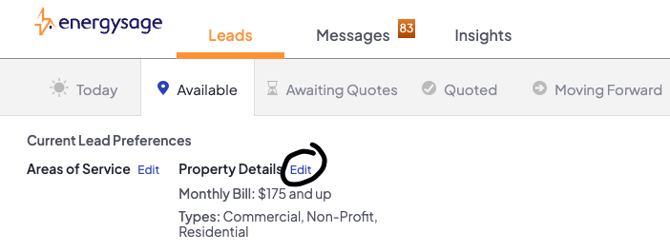
Click Edit under Property Details, and adjust their property type preferences:
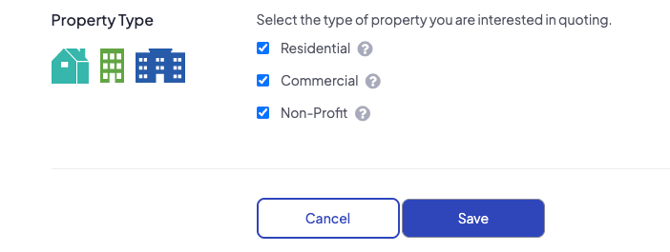
If your company has dedicated commercial solar specialists, we recommend they check only "Non-Profit/Commercial" in their settings, while other team members who focus on residential projects should uncheck "Non-Profit/Commercial" to filter out C&I opportunities. This approach ensures commercial leads are directed to the appropriate team members from the start. Keep in mind that you can always reassign leads to different representatives as needed after they've been received.
Pricing and payment
Reporting Sales
EnergySage uses an end-of-month reporting process for commercial leads. To report a closed deal:
- Submit any deals you've won during the previous month
- Our team will process payments based on your reported closures and agreement terms
Understanding Pricing
The C&I Marketplace operates on a pay-per-close model. Contact your Partner Success Manager for current pricing information and to understand how pricing applies to leads delivered to your company.
Important: Pricing terms may change over time. You will be notified at least 30 days before any pricing adjustments, giving you the opportunity to decide whether to continue receiving commercial leads.
FAQs
How do we determine which leads qualify as commercial leads?
When consumers register on EnergySage, they indicate whether they are a homeowner, business owner, or nonprofit. Leads from consumers who select "Business Owner" or "Non-Profit" are categorized as C&I leads and enter the commercial marketplace.
How many commercial leads can I expect?
Commercial solar projects make up a smaller portion of the overall market, so you should expect considerably fewer opportunities compared to residential leads. We recommend maintaining your residential lead flow while treating commercial leads as supplemental opportunities.
Does AutoQuote work for commercial leads?
No. Commercial leads are not compatible with AutoQuote. Any lead marked as commercial will not trigger AutoQuote functionality. You'll need to respond to commercial leads manually.
Can I automatically assign commercial leads to a specific sales rep?
No. Our platform does not currently support automatic assignment of commercial leads to specific sales reps. Leads can only be automatically assigned based on geography within your areas of service setting.

Can I receive residential leads in certain geographies and commercial leads in others?
No. If you are receiving both residential and commercial leads, your areas of service setting will determine where you receive leads for both property types.
How do I report sales?
EnergySage uses an end-of-month reporting process. You'll need to report any deals you've won during the previous month, and our team will process payments based on your reported closures.
How to get help
For questions about configuring your settings, accessing C&I opportunities, or any issues you encounter, please reach out to installersuccess@energysage.com or contact your Partner Success Manager.
We're continually refining the C&I marketplace experience. Your feedback is valuable and helps us improve the platform for all partners.